Reviewer Maker AI: your notes and handouts, turned into a reviewer for your next exam

How do you make a reviewer with AI? Paste your notes or take a photo of your handout in Synt and it writes the reviewer for you: the key points of the lesson first, then practice questions and flashcards from the same material. It works in your browser, and you can try it below without an account.

Quiz on Friday, long test next week, periodical exams after that — and a stack of handouts and modules to review. Instead of copying everything into a notebook, paste the lesson or snap the pages and Synt turns them into a reviewer: a short summary of what matters, then multiple-choice questions to check yourself, all from your own teacher’s material. Works in your browser, no install needed — or grab the app.

Got a text handy? Paste it below and see the summary now — no sign-up.

Reviewer from your handouts Practice questions included
200K+
Students
4.5
App Store rating
3,700+
Ratings worldwide
Student reviewing on a phone with a reviewer made from class handouts

Try it now: paste your notes and see the summary

No sign-up needed. Paste a section of your notes (200 to 6,000 characters) and get the main idea and the key points — the same engine that summarizes whole documents in Synt.

0 / 6,000 characters (min. 200)

Want the full summary, with a quiz and flashcards, saved in your account? Create your free account

What goes into a reviewer made with AI?

Key points, not the whole chapter

Synt condenses the lesson into the main idea and the points you need to remember. You choose the length, from a short summary to a detailed one.

Practice questions with answers

From the same material, a 20-question multiple-choice quiz. You answer, see what you got right and go back to the ones you missed.

Flashcards for terms and dates

Definitions, formulas, names and dates become flashcards — the part of a reviewer you drill on the commute or the night before.

Works with photos of handouts

Handouts, photocopies, modules and handwritten notes: take a photo and Synt reads the page. Uploading a PDF works too, with Synt Pro.

How to make a reviewer in three steps

1

Add the lesson

Paste the text of your notes or module, or photograph the handout. One lesson per reviewer works best; you can add the next one later.

Adding class handouts to the AI reviewer maker
2

Get the reviewer

Synt writes the summary with the key points, then the quiz and the flashcards from the same text — no typing up your notes first.

AI writing a reviewer with the key points of a lesson
3

Review until it sticks

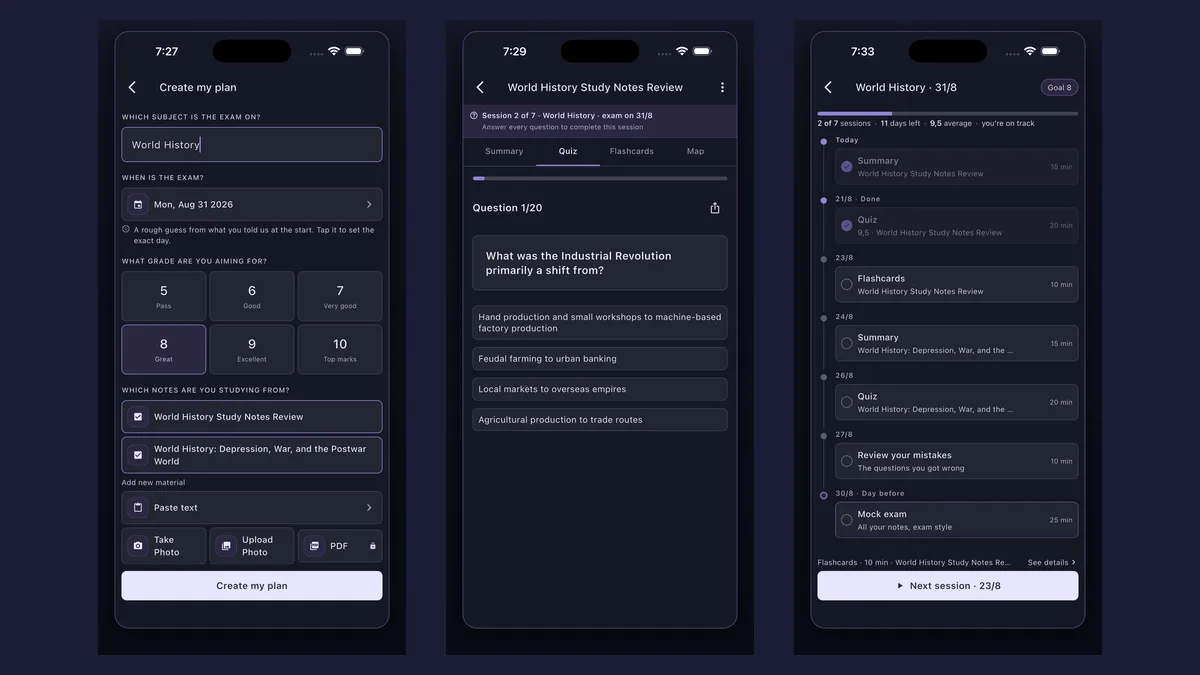
Answer the questions, then go back to the flashcards for what you missed. If the exam has a date, the study planner spreads the review over the days you have left.

Synt app in three screens: creating a study plan with the exam date and target grade, a 20-question quiz, and the sessions scheduled up to exam day
3 in 1

summary, practice quiz and flashcards from the same handout

20

multiple-choice questions per quiz, checked as you answer

1 photo

of the page is enough to start — no typing

A reviewer for every exam in the school year

In the Philippines a reviewer is what you study from before a quiz or an exam. Synt makes it from your own teacher’s material, so it matches what will actually come out.

Quizzes and long tests

One lesson, one reviewer: the key points, 20 practice questions and flashcards, ready before Friday’s quiz or next week’s long test.

Quarterly and periodical exams

Add every lesson the exam covers and set the exam date: the study planner spreads the review over the days you have left.

Prelims, midterms and finals

In college, turn each handout or slide deck into its own reviewer, then retake the questions you missed during exam week. For a timed run, use the practice test generator.

Board exam and Civil Service reviewers

Reviewing for the LET, the NLE or the Civil Service Exam? Make reviewers from your review-center handouts, one topic at a time. Synt doesn’t come with ready-made board exam questions: it tests you on the material you add.

Reviewer Maker FAQ

What is a reviewer?

In the Philippines, a reviewer is the study material you prepare before a quiz or an exam: a condensed version of the lesson with the key terms, often with practice questions. Synt makes both parts from your own notes.

How do I make a reviewer from my notes?

Paste the text or take a photo of the pages in Synt. You get the summary with the key points first; from there, one tap makes a quiz and another makes flashcards.

Is the AI reviewer maker free?

Yes — in your browser at app.synt.app or as an app on iOS and Android. The free version lets you make reviewers every day, up to a daily limit; Pro unlocks unlimited generations, PDFs and longer documents.

Can I use it on my computer, without installing anything?

Yes. Go to app.synt.app in any browser, create a free account and you get the same summaries, quizzes and flashcards as in the app; your material syncs between your phone and your computer.

Can I use it for long tests and periodical exams?

Yes. Add each lesson the exam covers and create a study plan with the exam date: Synt schedules short sessions — summary, quiz, flashcards, a review of your mistakes and a mock exam the day before.

Does it work with handouts and modules in PDF?

Uploading a PDF is part of Synt Pro. Without paying, you can paste the text from the PDF or take photos of the pages.

Can I share the quiz with my classmates?

Yes. A quiz made in Synt can be shared with a 6-character code or a link, so your study group answers the same questions.

What is the best way to use a reviewer?

Close the reviewer and answer the questions first; reread the summary only for what you got wrong. Testing yourself is what makes it stick — see active recall and spaced repetition for the schedule.

Can I make a reviewer for the board exam?

Yes, from your own review materials: add the handouts or notes for each topic and Synt makes the reviewer and the practice questions from them. It doesn’t include ready-made board exam questions.

Make Your First Reviewer Free

Join 200,000+ students who study smarter with Synt.